A soundcheck before doors open. A backstage photo after the encore. A short rehearsal video that never makes it onto an artist’s main Instagram feed. For music fans, Stories offer another way to follow the performers they love, beyond official releases and polished concert footage.
Sometimes you want to watch those public updates without your own Instagram account appearing in the viewer list. Other times, you want to download a favorite clip so you can revisit it after the Story disappears. You may already use Instagram every day; anonymous viewing and downloading simply give you more choice over how you browse and save public content.
DolphinRadar’s Story Viewer is designed around those two needs. Here is how it works and how it can fit into following artists, tours, and festival updates.
Why Music Fans Might Want to Browse Stories Anonymously
Discovering music often involves looking beyond the artists you already follow. You might hear an opening act at a concert, discover a singer through a playlist, or spot an unfamiliar DJ on a festival lineup. Their public Stories can offer a glimpse of their performances, personality, and creative work.
You can be curious without wanting your Instagram username attached to every Story you watch. Anonymous viewing lets you explore available public updates without using your personal Instagram account to open them.
The same approach can be useful when checking updates from several performers. Instead of switching between Instagram accounts or browsing through a public-facing profile, you can search for a public username in your browser. The purpose is straightforward: watch the content you are interested in while keeping your own account out of that viewing activity.
What DolphinRadar’s Anonymous Story Viewer Offers
DolphinRadar’s anonymous Instagram Story viewer lets you view and download available Stories and Highlights from public Instagram accounts. Basic viewing and downloads are free, and you do not need to log in to Instagram or install an app.
Because the service does not use your personal Instagram account to load the content, your Instagram username does not appear in the Story’s viewer list. Downloading available content through the tool also does not notify the account owner.
The product page lists downloads in original quality without watermarks. That makes the tool useful when you want to save an available video rather than capture a still image from it, or keep a Story photo without adding a watermark from the downloader.
The public-account requirement matters. DolphinRadar does not provide access to private profiles or content restricted to selected viewers. Its anonymous viewing features apply to publicly available content.
How to View an Artist’s Stories Anonymously
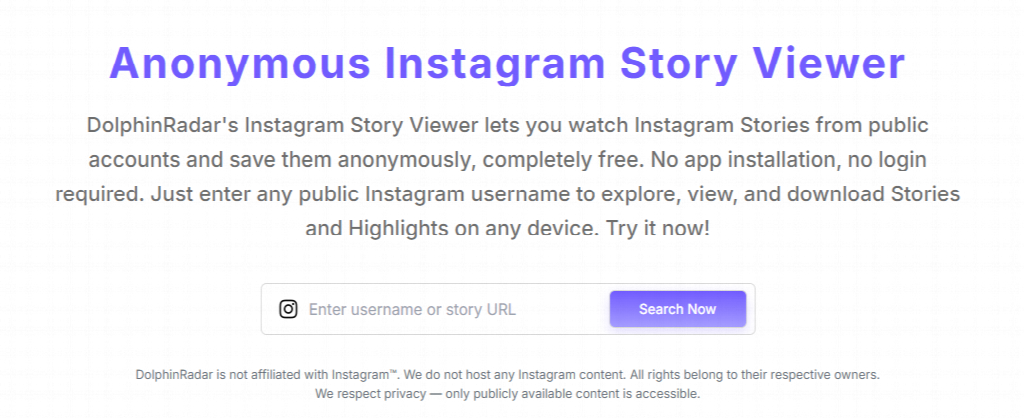
The process follows the three steps shown on DolphinRadar’s product page: get the Instagram username, enter it into the search field, and select “Search Now.”
1. Get the Artist’s Instagram Username
Use the Instagram username of the public account you want to view. Enter the username rather than the artist’s display name, since the two may differ.
If you are checking a band, festival, or venue, use that account’s own username. This keeps the search focused on the profile whose Stories you actually want to browse.
2. Enter the Username Into the Viewer
Open the Story Viewer page and paste the Instagram username into the search field. There is no need to connect your personal Instagram account for basic viewing.
The viewer works in a browser on mobile devices, tablets, and computers. You can check a public profile from your phone while travelling or use a larger screen when browsing at home.
3. Select “Search Now”
Click “Search Now” to load the available Stories from that public profile. You can then browse the content returned by the service without opening it through your personal Instagram account.
Available Highlights can also be viewed. These can be useful when an artist has grouped public content around a tour, album, or performance, giving you more to explore beyond the current Stories.
How Story Downloads Fit Into Following Music
Viewing answers the immediate question of what an artist has shared. Downloading gives you a way to keep an available photo or video you would like to revisit.
Save Another Perspective on a Concert
An artist might share a view of the crowd, a moment from the stage, or a short backstage update after a performance. If you attended that show, an available Story can add another perspective to your own memories of the night.
DolphinRadar’s download feature lets you save accessible Story photos and videos to your device. You can return to a favorite clip without relying on it remaining in the artist’s current Stories.
Keep a Rehearsal or Studio Clip
A stripped-back rehearsal or a brief studio preview can be interesting in its own right. Saving an available video lets you revisit its audio and performance details rather than keeping only a screenshot.
These are examples of content artists may share, not a promise that a particular account will have those clips available. A rehearsal preview also remains a preview; it does not establish a release date or confirm what the final recording will sound like.
Revisit Public Highlights
Highlights can collect moments from a festival appearance, a previous tour, or an album campaign. DolphinRadar supports viewing and downloading available public Highlights as well as Stories.
This gives fans a way to save selected content from those collections. Downloading does not transfer copyright, so get permission before republishing an artist’s photos or videos elsewhere.
Free Viewing Versus Ongoing Tracking
For an occasional visit, the free features cover anonymous viewing and downloads of available public Stories and Highlights. You can search a username, browse what is accessible, and save the content you want without an Instagram login.
If you want to follow a profile’s updates over time, DolphinRadar also offers paid features. The product page describes daily tracking, automatic archiving of Stories and Highlights, and email notifications when new content appears.
Those features serve a different need from a single search. During a tour, for example, you may want updates from one public profile without repeatedly checking it manually. Tracking and notifications provide an ongoing option, while the free viewer suits occasional browsing and downloading.
Keep the distinction clear: free access does not include every ongoing tracking feature, and starting tracking does not promise recovery of content that disappeared before it began.
|
Feature |
Free viewing and downloads |
Paid ongoing tracking |
|
Anonymous viewing of available public Stories and Highlights |
Included |
Included |
|
Downloads of available public Stories and Highlights |
Included |
Included |
|
Daily profile tracking |
Not included |
Included |
|
Automatic Stories and Highlights archiving |
Not included |
Included |
|
Email notifications for new content |
Not included |
Included |
Common Questions
Will My Instagram Username Appear When I View a Story?
DolphinRadar loads available public content without using your personal Instagram account, so your username does not appear in the Story’s viewer list through that viewing session.
Are Viewing and Downloading Free?
Yes. The product page offers free anonymous viewing and downloads for available public Stories and Highlights. Continuous tracking, automatic archiving, and notifications are paid features.
Can I Use It on My Phone?
Yes. The viewer is browser-based and works on mobile devices as well as tablets and computers, with no app installation required.
Can I View a Private Account?
No. DolphinRadar only accesses publicly available content. A private profile is outside the Story Viewer’s supported scope.