

A continuous recording security camera saves video for long periods without waiting for motion. It suits homes, stores, offices, and outdoor areas that need constant video monitoring. Reliable 24/7 surveillance also requires steady power, enough storage, and suitable recording settings.
What Is a Continuous Recording Security Camera?
A continuous recording security camera captures video during every period included in its schedule. True 24/7 recording covers every hour, while scheduled recording covers selected daily periods only.
How Does Continuous Recording Work?
The camera creates a continuous video stream and sends or saves footage to storage. Storage can include microSD, NVR, local hub, NAS, FTP, or supported cloud services. When storage fills, many systems overwrite the oldest footage to continue saving video.
Users can later choose a date and time to review recorded footage easily. “Continuous” can mean true 24/7 recording or continuous recording during a user-defined schedule, depending on the settings chosen.
Continuous Recording vs. Motion-Activated Recording
These two recording methods serve different goals, and the right choice depends on how complete a video record the property needs. Continuous recording keeps a full timeline, while motion recording saves clips after detected activity.
- Recording behavior: Continuous recording captures video throughout the scheduled period, while motion-activated recording starts when activity is detected.
- Storage use: Continuous recording requires more storage, while motion recording uses less by saving mainly event-based footage.
- Power use: Continuous recording typically consumes more power, while motion-activated recording is generally more power-efficient.
- Best use: Continuous recording is better for users who need a complete video history, while motion recording suits event-focused monitoring.
- Missed context: Continuous recording is less likely to miss activity before or after an event, while motion recording may provide less surrounding context.
What Do You Need for 24/7 Security Camera Recording? 4 Key Features to Look For
The best continuous recording security camera should match your location, needs, and long-term costs. The four features below affect whether 24/7 recording stays reliable over time.
1. A Reliable Power Source
Power matters because 24/7 cameras cannot spend long periods in low-power sleep states. PoE cameras use one Ethernet cable for both power and stable network data, while plug-in cameras receive steady power from an outlet throughout continuous daily recording periods.
Large batteries with solar charging may support certain cameras under suitable outdoor conditions. However, sunlight, temperature, and video settings can change battery runtime during continuous recording. Always confirm continuous recording support for the exact battery camera model before purchase.
2. Enough Storage Capacity
Continuous video uses much more storage space than shorter motion-based video recording clips. A microSD card can suit one camera with moderate local video retention needs, while an NVR supports several cameras and usually provides longer storage for continuous recordings.
A Home Hub offers another local storage choice for supported security camera systems. Some models also support NAS storage, FTP servers, or compatible third-party recording systems. Cloud storage may work on certain systems, but limits and monthly fees can apply.
3. Stable Network Connectivity
A stable network matters when video travels to another device for remote storage, such as an NVR, NAS, FTP server, local hub, or computer. Wired Ethernet often provides a steadier connection than Wi-Fi for constant video transmission.
Some cameras keep recording locally during internet outages when power and storage remain available. Internet access mainly supports remote viewing, alerts, and playback while users are away.
4. Subscription Costs
A 24/7 security camera system does not always require a paid monthly subscription. Local storage may avoid monthly fees, while cloud services can create recurring charges.
Which Types of Security Cameras Can Record 24/7?
Several camera types support continuous recording, although their power and storage needs differ. Understanding each type helps buyers match the right hardware to the location and recording goal.
PoE Continuous Recording Cameras
Best for: permanent 24/7 surveillance.
PoE cameras suit permanent areas that need steady 24/7 security monitoring every day. They work well where Ethernet can provide continuous power and stable network access. PoE cameras also pair with NVRs for longer retention and easier multi-camera playback.
Plug-In Wi-Fi Continuous Recording Cameras
Best for: easier installation where Wi-Fi is available.
Plug-in Wi-Fi cameras suit places with strong Wi-Fi and nearby electrical power outlets. They offer easier installation when running Ethernet to the camera would be difficult. Wireless data does not mean wire-free power, because these cameras still need power cables.
They can record continuously when supported, provided the Wi-Fi connection remains stable enough.
Battery-Powered Continuous Recording Cameras
Most battery cameras use event recording because continuous video consumes much more energy. Motion-based operation lets cameras sleep between events, which helps save available battery power. Continuous recording keeps imaging, video processing, and storage functions active for longer periods.
This constant activity can drain standard batteries much faster than motion-based event recording. Some newer battery models support scheduled continuous recording with larger built-in battery systems. Optional solar charging can extend runtime when sunlight and outdoor conditions remain suitable.
Check recording limits, storage, charging needs, and local operating conditions before choosing a battery model. Connecting power does not add continuous recording when the camera hardware lacks support.
Security Camera Systems With NVRs
Best for: large properties requiring multiple-camera 24/7 surveillance
NVR systems suit properties that need several cameras recording continuously throughout each day. They provide centralized storage, easier schedule control, and more convenient multi-camera video playback. Larger NVR drives can retain much more footage than small camera memory cards.
Reolink Continuous Recording Cameras: What Are Your Options?
Reolink offers several continuous recording choices for different coverage, storage, and installation needs. Each option below follows a scenario-to-model approach so buyers can match the camera to their specific situation.
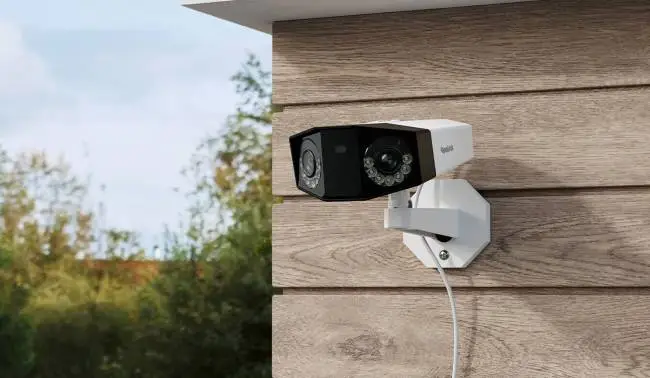
Reolink Duo 3 PoE: For Wide-Area 24/7 Monitoring
Wide driveways, yards, and exterior areas often need broad coverage and steady power. The Duo 3 PoE fits these areas with wide viewing and stable PoE power. It provides a 180-degree horizontal view and supports video resolution up to 16MP.
It supports 24/7 recording through microSD, compatible Reolink NVRs, and supported FTP servers.

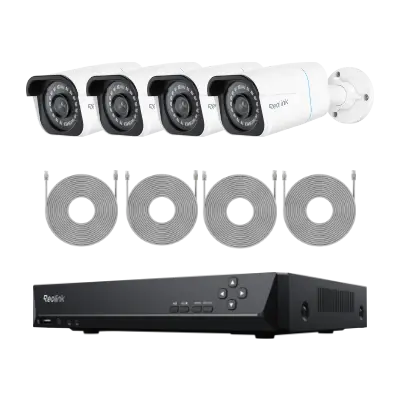
Reolink RLK8-800B4: For Multi-Camera 24/7 Recording
Whole-home properties often need several cameras and one central place for video storage. The RLK8-800B4 meets this need with multiple PoE cameras and centralized NVR recording. The package includes four 4K PoE cameras and an RLN8-410 NVR for storage.
Its NVR includes a preinstalled 2TB drive for saving continuous recorded video footage. Reolink lists simultaneous 24/7 recording and storage expansion support reaching up to 16TB.
Reolink Altas PT Ultra: For Flexible Battery Continuous Recording
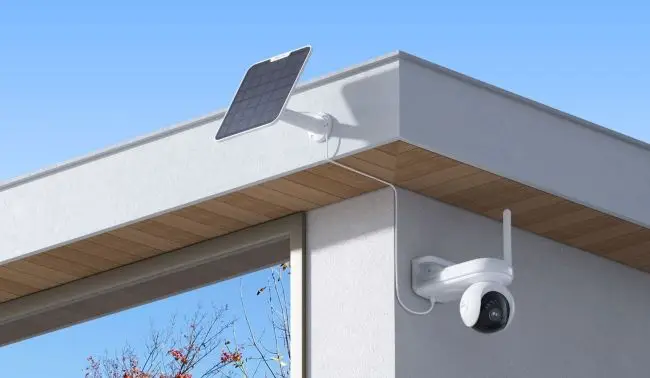
Some locations make running Ethernet or electrical power difficult, expensive, or simply inconvenient. The Altas PT Ultra offers battery-powered continuous recording for these harder installation areas. It includes a 20,000mAh battery and supports scheduled continuous recording at 4K resolution.
Reolink states its battery can support up to 96 hours of continuous recording. Actual runtime can change with camera settings, use patterns, and local operating conditions. It supports local storage through microSD cards and compatible Reolink Home Hub options.
How to Set a Security Camera to Record 24/7
Menu names differ between brands, but the main setup process usually remains similar. Follow these steps for most security camera systems before enabling continuous recording.
Step 1: Confirm Continuous Recording Support
Check the manual or support page and confirm your exact model supports continuous recording.
Step 2: Install or Configure Storage
Install microSD storage or connect a supported NVR, hub, NAS, or FTP server.
Step 3: Enable Continuous Recording
Open recording settings and choose continuous, timer, normal, or scheduled recording when available.
Step 4: Set a 24/7 Recording Schedule
Select every daily hour for 24/7 recording, or choose only your required periods.
Step 5: Configure Overwrite Settings
Enable automatic overwrite so new footage can replace the oldest stored video when needed. Save important recordings elsewhere before the system replaces those older stored video files.
Step 6: Test Recording and Playback
Record briefly, then open playback and confirm the timeline shows continuous saved video.
Step 7: Check Available Storage and Retention
Review free space and retention because higher video quality reduces stored recording days.
How to Set a Reolink Camera to Record 24/7
Reolink currently uses “Continuous” in its App and Client continuous recording setup instructions. Some interfaces use “Timer,” and the camera still needs supported storage before setup.
- Confirm your Reolink model supports continuous recording before changing its current recording settings.
- Install a supported microSD card or connect a compatible NVR or Home Hub.
- In the Reolink App, open Device Settings and then select Camera Recording settings.
- Enable recording, then open Continuous Recording Schedule to configure the required recording periods.
- Select every available time block when you want full 24/7 continuous recording enabled.
- Save the schedule, then check Playback to confirm the recorded video appears there correctly.
- Follow Reolink guidance for App, Client, browser, NVR, or Home Hub setup steps.
FAQs
Do Security Cameras Record All the Time?
Some security cameras record continuously, while many others only save detected motion events. Continuous recording requires model support, enough power, and enough available video storage space. Many traditional battery cameras only record after detecting movement or another supported event.
Can Wireless Security Cameras Record Continuously?
Plug-in Wi-Fi cameras can record continuously when they have steady power and model support. Wi-Fi carries data, while the connected power cable keeps the camera operating continuously. Some battery Wi-Fi cameras also support continuous recording, but capability varies by model.
Do You Need a Subscription for 24/7 Security Camera Recording?
A subscription is not always required for continuous security camera recording at home. Local microSD, NVR, hub, NAS, or FTP storage may avoid ongoing monthly fees. Cloud recording or extra online services may still require a paid subscription plan.
Conclusion
A continuous recording security camera provides a complete video timeline for 24/7 surveillance. Reliable continuous recording still requires suitable power, enough storage, and supported recording modes. PoE and plug-in cameras remain practical choices for long-term continuous security video recording.
Selected battery models can cover locations where installing new power wiring remains difficult. Check recording mode, storage, retention, network needs, and total costs before choosing equipment.