Whether you’re a studio owner or a homemaker, the right laser wood engraver can turn your creative ideas into highly detailed, professional-looking designs. With the right setup, you can turn wood blanks into detailed gifts, signs, and small-batch products.
Laser wood engravers are computer-controlled machines that use a highly focused beam of light to burn, or scorch, designs onto wood surfaces based on a digital design file.
The market is full of machines with advanced features that deliver superior-quality finishes. But you should pick a machine based on your workshop space, budget, and the level of detail your projects require. In this article, we will break down how a laser engraver for wood works, compare diode versus CO₂ technologies, and review our top picks for the best laser engraver for wood, led by the versatile Bambu Lab R1.
What Is a Laser Engraver for Wood?
A wood engraving machine, often referred to as a laser etcher for wood, is a specialized CNC machine that uses a focused beam of laser light to burn, mark, or etch designs onto wooden surfaces with high precision. It etches the surface without any physical contact with the wood.
Here’s how it works:
● You upload your digital design into a software program.
● Place wood on the working bed and set engraving parameters, such as power and speed.
● The laser head moves across the wood surface, engraving or etching the material.
With suitable wood and settings, this simple process can produce crisp, repeatable results.
Diode vs CO2 for Wood Engraving
When you step into the market for a laser engraving machine for wood, you’ll come across different types of engravers, including CO2 and diode lasers. Each type has its own strengths and limitations. They differ in working mechanism, maintenance, and cost.
Let’s see how they compare:
● Engraving Quality: Both machines produce sharp details but behave differently on natural materials. Blue diode lasers can produce detailed, high-contrast engravings. Many desktop CO2 systems support faster raster engraving, but depth, contrast, and consistency depend on the machine, focus, power, speed, and wood.
● Ease of Use: Diode machines range from open-frame models with manual focusing to enclosed systems with cameras and autofocus. CO2 machines require more setup and maintenance. But these machines, particularly enclosed systems, often have camera positioning, autofocus, and automated alignment to speed up everyday use.
● Cost: Diode lasers have a lower entry price and are a good starting point for a wallet-friendly option. CO2 machines have a higher initial cost due to the glass tubes, power supply, and the need for cooling or ventilation.
● Studio Fit: Diodes fit standard workbenches, but open frames need safety glasses and active smoke management. Many desktop CO2 units are enclosed, but they still require proper exhaust ventilation.
When to Choose CO2 vs. a Diode
● Diode (like the Creality Falcon): Best if you are a casual hobbyist, on a tight budget, or making occasional gifts in a small space.
● CO2 (like the Bambu Lab R1): Best for starting a small business, handling customer orders in bulk, or working in a closed home studio.
Starting with a diode laser is a smart, low-risk way to learn the basics. But as your order volume increases and you’re looking for faster turnarounds with an enclosed system, stepping up to a CO2 laser engraver may be worthwhile. It still requires supervision during operation.
Quality Depends on More Than Wattage
It’s easy to assume that a higher wattage CO2 laser will necessarily produce better-looking engravings on wood. But crisp, clean engraving detail comes down to a few basic variables:
● Spot Size: Smaller focal spot creates thinner lines and finer text.
● Power Control: Adjusting your beam prevents small details from burning out.
● Wood Grain: Hardwoods like maple engrave easily. Softwoods like pine will scorch unevenly along the grain lines.
● Image Setup: Having your artwork at the right contrast and speed settings makes a bigger difference than raw machine power.
Best Woods for Engraving by Project Type
Wood laser engraving can produce very different results depending on the material. The same laser settings may give very different results on two different types of wood. A pale maple board will show the lettering crisp, but a board with a heavy grain will make the same design look uneven. The density of the wood, the natural color, the grain patterns, and the surface consistency will influence the final engraving.
Instead of simply selecting wood based on what looks good, think about the piece you’re making and how you want the finished product to look.
Gifts and Keepsakes
Imagine engraving a family name onto a wooden keepsake box or personalizing a coaster with a short message. These projects often have tiny lettering and fine details, so a smooth, predictable surface makes a difference.
Best Woods: Maple, Cherry, Walnut & Beech.
Grain and Consistency: Maple and beech usually have a fine, relatively even grain, which is good for detailed designs. Walnut has a lot of natural character, and cherry is a little smoother looking, with a little grain variation.
Contrast: Light-colored maple and beech provide a good background for dark engraved marks. Walnut has a darker surface, which gives a more subtle result, while cherry has a warm reddish tone that suits personalized gifts.
Home Signs and Wall Art
For a large family name sign, decorative wall panel, or engraved quote, the wood becomes part of the artwork. You need a material that looks attractive across a larger surface and doesn’t distract from the design.
Best Woods: Basswood, Baltic birch plywood, and alder.
Grain and Consistency: The basswood has a light and fairly subtle grain, which makes it a nice wood for decorative artwork. Alder gives a fairly even surface with a warmer look. The quality of the internal layers can vary, but good-quality Baltic birch plywood will have consistent face veneers.
Contrast: The light-colored surface of basswood makes lettering and illustrations stand out when engraved. Alder creates a warmer-looking mark, while Baltic birch offers a neutral background for signs and geometric designs.
Photo Engraving on Wood
Etching on a wooden plaque is more difficult than etching a name or logo. Facial features, shadows, and small tonal changes all need to remain visible, so the surface should not compete with the photograph.
Best Woods: Basswood, light-colored maple, and high-quality birch.
Grain and Consistency: Look for boards that are not too knotty and have a pretty consistent grain. Strong grain lines can run across faces and other important details, making the image more difficult to read.
Contrast: The pale wood provides a useful background for the darker marks created by the laser. This allows the portraits to retain visible detail, but the image preparation, dithering, focus, and engraving settings also play a role in the result.
Small-Batch / Repeat Logos
If you’re engraving the same logo on a batch of wooden keychains, product tags or branded coasters, consistency is more important than decorative grain. You want each item to look the same and not have to keep changing your machine settings.
Best Woods: Alder, bamboo, and suitable high-quality plywood.
Grain and Consistency: Alder has a fairly even surface, and good plywood can have consistent face veneers from sheet to sheet. Bamboo is another option, but how it is laminated and the manufacturing process can affect how it will engrave.
Contrast: On light-colored bamboo and alder, logos and lettering can be visible. Branded products can also work well with plywood, as long as the surface veneer is smooth and consistent.
Safety Note: Always vent your workshop well and never leave your laser unattended. Avoid pressure-treated timber, wood with unknown glue or paint, PVC/vinyl, and plastics of unknown composition. For engineered materials like MDF or plywood, check that the glues are safe for laser work.
How to Choose a Laser Engraver for Woodworking
Choosing the right machine involves looking at how practical features match your workspace and project goals. Whether you are setting up a hobby corner at home or building a small product line, keep these factors in mind:
● Detail & Power Control: Look for machines with a small focus spot and smooth power modulation so your text stays crisp and your light shades don’t burn out.
● Work Area & Positioning: Ensure the bed size matches your typical projects and look for camera alignment or framing tools to make placing your artwork simple.
● Software & Maintenance: Choose a system with easy software and maintenance, from cleaning a diode lens to maintaining a CO2 mirror path.
● Enclosure, Exhaust & Total Cost: Include safety gear from day one. Open-frame diode kits need appropriate laser-rated eye protection, a controlled laser-safe setup, and effective smoke extraction. Enclosed desktop units help contain fumes, but still need proper exhaust or a manufacturer-approved filtration system.
Best Laser Engraver for Wood: 2026 Picks
The right machine depends on your projects, workspace, and budget. The Bambu Lab R1 suits makers looking for a more capable CO2 setup, while Creality’s Falcon models offer accessible diode options for beginners and hobbyists.
Best Laser Engraver for Wood Overall: Bambu Lab R1
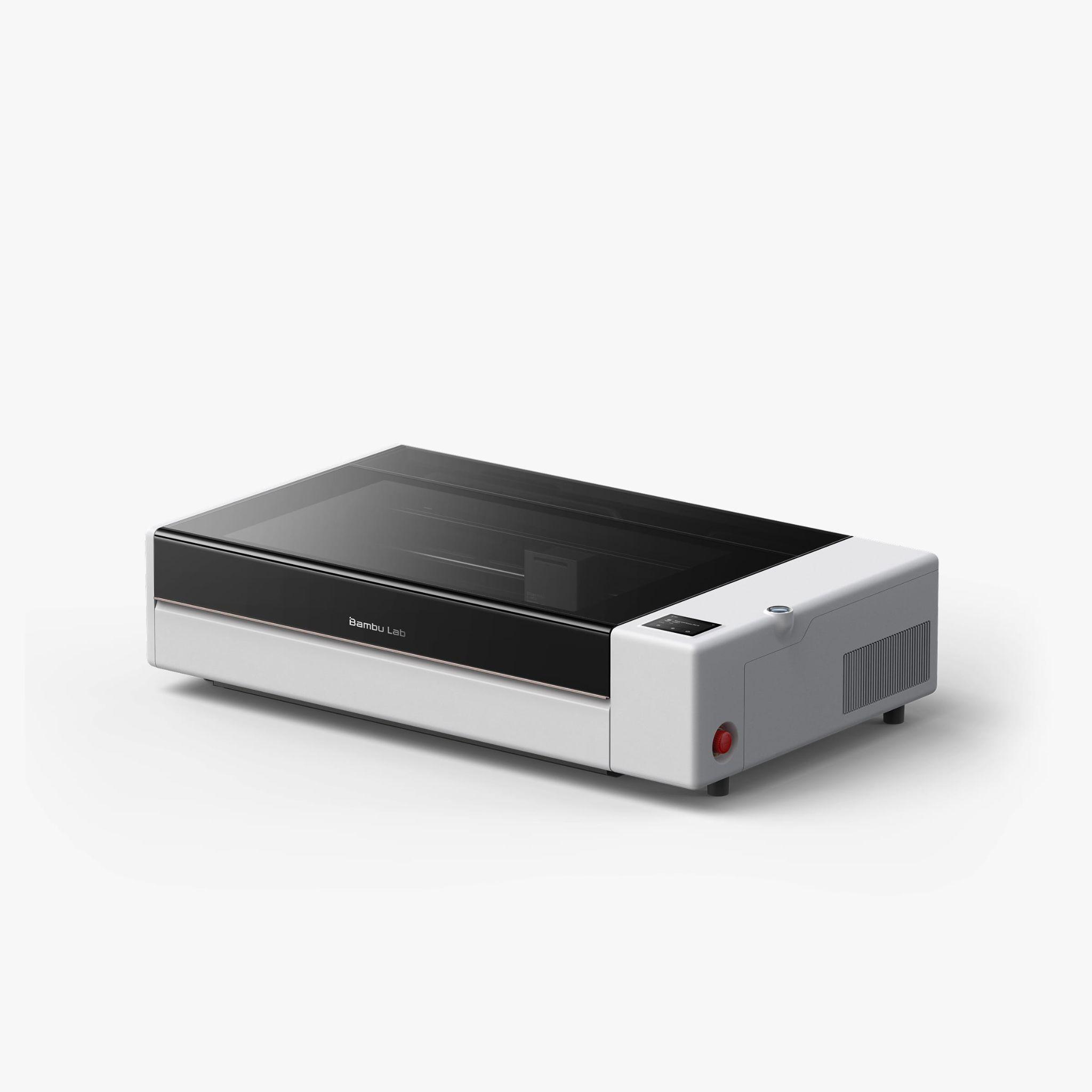
The Bambu Lab R1 is a strong choice for makers who need more room and a capable engraving workflow. Its 55W CO2 laser, automated alignment, and generous work area make it suitable for wooden signs, decorative panels, personalised products, and small-batch production.
Key specifications:
● Laser source: 55W CO2
● Working area: 600 × 300 mm
● Maximum engraving speed: Up to 1,000 mm/s
● Optical path calibration: Auto Laser Alignment
● Laser safety: Class 1 in standard enclosed use
● Approximate US price: $2,499
The 600 × 300 mm working area can accommodate larger pieces or multiple smaller items in a single setup. Auto Laser Alignment simplifies optical path calibration, and the motion control system allows precise movement during engraving. The enclosed design also makes it good for studios that want a contained workspace, but you’ll still want to have proper exhaust ventilation.
The main disadvantage is the investment. At roughly $2,499, it’s better suited for growing studios and businesses rather than occasional hobby projects.
Best Wood Laser Engraver for Beginners: Creality Falcon A1 Pro
The Creality Falcon A1 Pro is a beginner-friendly option for anyone who wants an enclosed diode machine without moving straight into a more expensive CO2 system.
Key specifications:
● Laser source: 20W diode
● Working area: 358 × 268 mm
● Positioning: Built-in camera
● Focusing: AI-assisted autofocus
● Maximum speed: Up to 600 mm/s
● Laser safety: Class 1
Its camera helps position designs on wooden items, making personalised gifts, coasters, and small signs easier to prepare. Autofocus also reduces manual adjustments, while the enclosed design suits home workshops.
The smaller working area is its main limitation, particularly for larger signs and panels. Check the current US price and package contents before purchasing, as included accessories and promotional offers can vary.
Best Budget Laser Engraver for Wood: Creality Falcon2 22W
If keeping the initial cost down is your priority, the Creality Falcon2 22W offers an affordable entry into wood engraving. Its open-frame diode design is suitable for signs, coasters, decorative pieces, and other small craft projects.
Key specifications:
● Laser source: 22W diode
● Working area: 400 × 415 mm
● Air assist: Integrated
● Maximum engraving speed: Up to about 417 mm/s (25,000 mm/min)
● Design: Open-frame construction
It features a 400 × 415 mm working area, sufficient to fit a range of project sizes, and integrated air assist to help remove smoke and debris during engraving. It also supports LightBurn and LaserGRBL for preparing the design and operating the machine.
The open-frame design necessitates more safety planning. When calculating the real setup cost, include the cost of a suitable enclosure, laser-rated eye protection and effective exhaust ventilation. Check the current price in the US and make sure your package has the accessories you need.
If you are a hobbyist and want a larger work area without the cost of an enclosed CO2 machine, the Falcon2 is worth a look.
Conclusion
Picking the best laser engraver for wood is about matching your projects with your daily workflow. If you want high-speed production and clean batch work, the Bambu Lab R1 offers a capable CO2 desktop experience in an enclosed package. If you are new to the game and just starting with a simple home setup, the Falcon A1 Pro offers a beginner-friendly enclosed diode workflow, and the Falcon2 22W is a solid pick for budget-conscious makers who are comfortable setting up an open-frame system with appropriate safety gear and exhaust ventilation.