


Most app stores are full of the same familiar categories: messengers, fitness trackers, photo editors, games. They are useful, but sometimes you want something less predictable. This article looks at fun apps that feel different from everyday tools. Some focus on entertainment. Others add a creative or educational layer.
LooxUP

Platforms: iOS
LooksMaxxing App LooxUP uses AI to analyze a selfie and rate facial features such as symmetry, proportions, jawline, skin, hairline, and overall facial balance. It also gives users a personalized improvement plan for hair, skincare, style, and progress tracking.
Key Features
- AI Face Rating. The app gives an attractiveness score from 1 to 10 and breaks down which facial details affect the result.
- Facial Structure Analysis. LooxUP reviews proportions, symmetry, jawline definition, eye area, and overall facial harmony to show what shapes the final score.
- Hair and Hairline Guidance. The app checks how hair and hairline affect appearance, then suggests styles that may better match the user’s face.
- Skincare Guidance. LooxUP analyzes skin quality, tone, and texture, then gives practical suggestions based on visible skin condition.
- Style Recommendations. The app suggests clothing and color choices that fit the user’s features, making the advice broader than face scoring alone.
- Personalized Improvement Plan. LooxUP turns the analysis into a step-by-step plan focused on hair, skin, style, and the details most likely to improve the user’s appearance.
- Progress Tracking. Users can track how their score changes over time as they apply the app’s recommendations.
Website: https://looxup.app/
Cat Translator

Platforms: iOS, Android
Cat Translator app is an entertainment application for cat owners. It records cat sounds, offers playful “translations” into human language, and lets users send their own words back as cat-like sounds. It also includes pet profiles, saved recordings, and AI pet content tools.
Key Features
- Meow Translation. Record your cat’s meows and get a playful human-language interpretation inside the app.
- Human-to-Cat Voice Conversion. Record your own message and turn it into cat-like sounds, which makes the app more interactive than a simple soundboard.
- Instant Capture. Start recording quickly when your cat meows, so the app fits short, real-life pet moments.
- Ready-Made Cat Emotions. Tap preset phrases like “Feed me” or “Play with me” and hear how they sound as cat-style audio.
- Pet Profiles. Create separate profiles for different cats and keep each pet’s translation history organized.
- Recording History. Save translations, replay favorite meows, and keep funny moments for later.
- Vocabulary Library. Browse cat phrases and sounds grouped by situation, which helps users try different reactions with their pet.
- AI Studio. Generate AI cat photos and videos from one pet upload using ready-made creative styles.
- In-App Games. Play simple mini-games inside the app when you want quick, light entertainment.
Website: https://cattranslator.io/
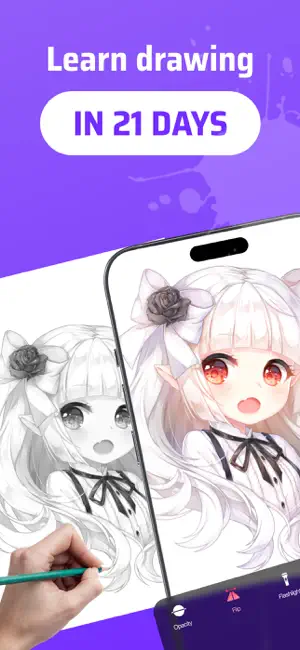
AR Drawing App ArtEasy
Platforms: iOS, iPadOS
ArtEasy helps users draw with augmented reality by projecting a sketch onto paper through the device camera. Users can trace ready-made templates, upload their own images, follow lessons, and use AI-generated sketches to practice.
Key Features
- AR Drawing Projection. Project a sketch onto a real surface through the camera, then trace the main lines on paper.
- Step-by-Step Drawing Lessons. Follow guided lessons that help beginners build drawings from the first lines instead of guessing where to start.
- Ready-Made Templates. Choose from 500+ templates across categories such as anime, cartoons, portraits, nature, animals, cars, flowers, food, and architecture.
- Custom Image Uploads. Add photos or references from the gallery or browser and turn them into sketch-ready guides.
- AI Sketch Generation. Use AI tools to create new sketch ideas when built-in templates do not match what you want to draw.
- My Templates Library. Save added images and personal drawing references in one place, so you can reuse them later.
- Offline Access. Use many features without internet after downloading the needed content.
- Beginner-Friendly Learning. Start with no drawing experience and practice form, proportion, and structure through guided tracing.
Website: https://arteasy.app/
Reface

Platforms: iOS, Android.
Reface is an AI entertainment app for face swaps and AI avatars. It lets users place themselves into different looks or characters, making it useful for quick visual jokes, social posts, and casual creative experiments.
Key Features
- Face Swap Editing. Put a face into different visual scenes and create playful results without advanced editing skills.
- AI Avatar Creation. Generate avatar-style images that let users try different identities, looks, or characters.
- Mobile App Access. Download Reface from the App Store or Google Play, so it works for both iPhone and Android users.
- Web Face Swap Tool. Try face swap directly from the Reface website before installing the mobile app.
- Fast Visual Experiments. Test different looks quickly, which makes the app better for entertainment than detailed professional editing.
- Shareable AI Content. Create short, eye-catching visuals for chats, social media, or meme-style posts.
Website: https://reface.ai/
Star Walk 2

Platforms: iOS and Android.
Key Features
- Real-Time Sky Map. Point your device at the sky and see stars, planets, constellations, satellites, and other objects matched to your location.
- AR Stargazing. Use the camera view to place charted sky objects over the live sky, which makes identification easier for beginners.
- Star Spotter Navigation. Move your device and let the map follow your direction using device sensors and GPS; on devices without a digital compass, you can move the sky map manually.
- Visible Tonight Guide. Check which planets, stars, and astronomy events you can see from your current location before you start observing.
- Time Machine Tool. Choose another date and time to see how the sky looked in the past or how it will look in the future.
- 3D Constellation Models. Explore constellation shapes, scale, position, stories, and basic astronomy facts through interactive 3D visuals.
- Deep-Sky Object Search. Find and study meteor showers, planetary nebulae, star clusters, satellites, comets, asteroids, and other sky objects.
- Night Mode. Switch to a red-toned interface that makes nighttime viewing more comfortable for your eyes.
- Sky Wavelength Views. Change the sky map display to view different wavelength ranges, including gamma, X-ray, visible spectrum, infrared, and radio.
- Astronomy News. Use the “What’s New” section to follow notable space and astronomy events inside the app.
Website: https://starwalk.space/