


A memory card hands back file names the camera invented. They are sequential, identical in shape, and silent about what was actually pointed at. On a small shoot that costs nothing, because you still remember the day. On a week of filming across several locations, the folder stops being navigable before the first cut exists.
The useful question is whether software can describe that footage before anyone sits down to watch it. Wondershare Filmora 16 addresses that problem with AI Media Analysis, which examines imported media and generates descriptive keywords. Those results can help editors identify potentially useful footage before reviewing every clip in detail.
Part 1. How AI Media Analysis Helps Organize Large Projects on Mac
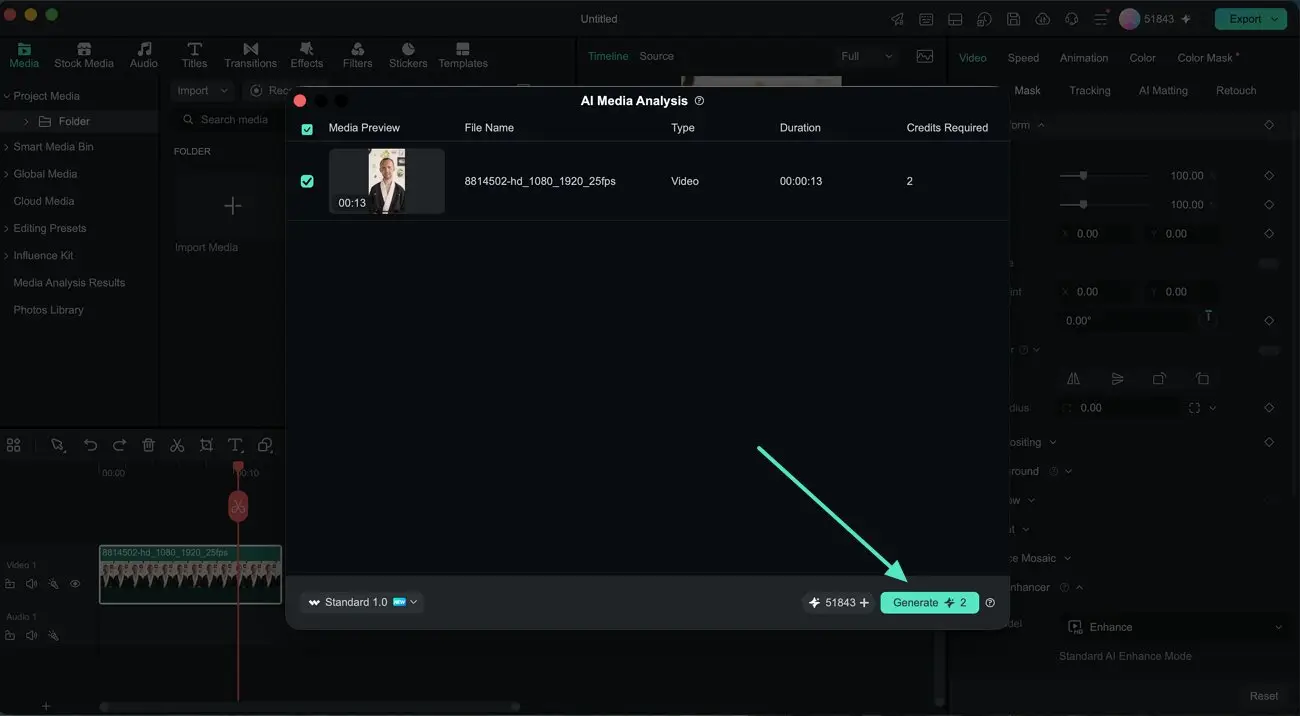
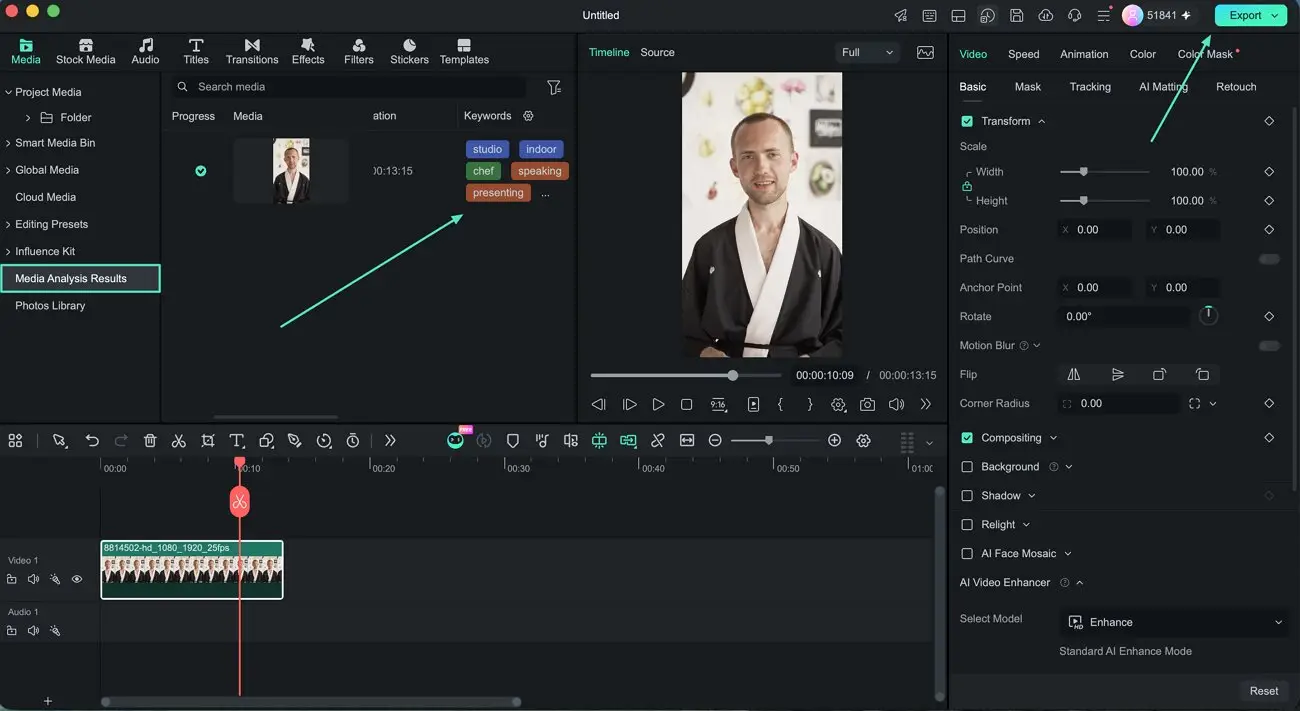
That search has to be built before it can be used. AI Media Analysis works only on files already imported into the project, accessed through a context menu in the “Media” panel. The window that appears confirms the file and shows the credits it will use, and “Generate” starts the job. Finished analysis collects under “Media Analysis Results,” and the detected keywords sit beside each file.
Note: The scope follows from what the tool actually looks at. AI Media Analysis works with supported video and image files already imported into the project, examining their visual content before detailed editing begins. Standalone audio files are not currently supported and should not be presented as part of this analysis workflow.
What the keywords are worth depends on the kind of library they are describing. Four project types come up most often, and each one is searched differently.
- Travel: Descriptive keywords can help distinguish footage from different locations and scenes. Editors can use those results to shortlist relevant travel clips and images for closer review.
- Events: Analysis results can help narrow large collections of event footage before manual review. Editors can then preview likely candidates for ceremonies, speeches, performances, and other important moments.
- Commercial Shoots: Detected keywords can provide useful context for separating similar takes. Editors can review the results, shortlist relevant product footage, and compare promising shots before adding them to the timeline.
- Any Large Library: AI Media Analysis becomes particularly useful when a project contains more footage than an editor can quickly review. It provides an initial organizational layer before detailed preview and selection.
Reviewing the results can make the first pass through a large library more focused. Each analyzed file appears with descriptive keywords that provide additional context about its content. Editors can use those results to identify likely candidates, then preview the footage before making final selections.
Part 2. From Media Organization to Editing
A list of keywords is only useful if it leads somewhere. For creators using Mac video editing software, those analysis results become most useful when they lead directly into selection, assembly, and finishing.
|
Stage |
What Happens |
What It Hands Forward |
|---|---|---|
|
Analysis |
Imported files come back with keywords attached |
A library you can search instead of scroll |
|
Selection |
Searching and grouping narrows the library to candidates |
A shortlist short enough to watch properly |
|
Assembly |
The shortlist goes to the timeline in running order |
A rough cut built only from material you chose |
|
Finishing |
Color, captions, and audio work run on that cut |
A video that only needs checking |
|
Export |
One render from the project you built |
A file that matches what you approved |
Nothing in the later stages depends on the analysis having been run. What changes is how much material reaches them, and a rough cut assembled from a shortlist carries fewer clips that get deleted an hour later. The benefit appears in the editing workflow, where a more focused shortlist can reduce unnecessary footage review before assembly.
Note: Running the analysis before the timeline exists is not a formality. A timeline built while sorting is still happening gets rebuilt when the sorting finishes. The order of the story changes as soon as better material turns up, so sorting first costs one pass through the library instead of two.
Part 3. Build a Smarter Pre-Editing Routine
One pass works best when it produces groups rather than a single long list. The routine itself needs nothing beyond a shoot you have already finished and a Filmora free download. What it will not produce is a finished selection, because a keyword answers only half of what a shortlist needs.
|
What Keywords Can Indicate |
What Manual Review Confirms |
|
Which clips may contain a relevant subject |
Whether that subject is clearly captured |
|
Which media may show a location or setting |
Whether the shot fits the intended scene |
|
Which clips may contain similar visual content |
Which take works best for the edit |
|
Which footage may be relevant to the project |
Whether its audio and visuals are usable |
|
Which clips deserve closer review |
Whether the timing and content fit the final cut |
The left column is a search result, and the right column is a viewing decision. Keywords describe what appeared in the frame, not how well it was captured, so a correctly labeled clip can still be unusable. Treat the output as a filing system rather than an opinion and confirm the shortlist in the preview.
Note: A confirmed shortlist is easier to use when it arrives already grouped. Group around how the video will be built rather than how the shoot ran. After reviewing the analysis results, editors can organize shortlisted footage around the planned video. Travel footage might be grouped by location, event footage by moment, and commercial material by product angle.
Conclusion
A grouped shortlist gives editors a clearer starting point than a folder filled with generic camera filenames. AI Media Analysis adds descriptive keywords to analyzed footage, helping narrow the material that deserves closer review. Editors can then preview promising clips and decide what belongs in the final cut. The AI supports organization and shortlisting, while selection, sequencing, and other creative decisions remain with the editor.