


AI writing tools can save time, but their output often needs another round of editing. Sentences can sound repetitive, the tone may feel too formal, and some paragraphs lack the natural flow you’d expect from a human writer.
Clever AI Humanizer aims to help with that. It offers a practical way to humanize AI-generated text, improve readability, and make AI-assisted drafts sound more natural. The platform has also expanded beyond rewriting, adding an AI detector, paraphraser, and grammar checker.
The interesting part? The main tools are currently free to use, without ads or a paywall. But how useful are they in practice, and what should you know before using them?
Here’s a closer look.
What Is a Clever AI Humanizer?
Clever AI Humanizer is an online writing platform designed to improve AI-assisted text and make it easier to read. Rather than simply replacing individual words, its Humanizer focuses on tone, sentence structure, clarity, and readability.
The website currently offers four main tools:
- AI Humanizer: Refines AI-assisted drafts, improving sentence flow, tone, and repetitive phrasing.
- AI Detector: Helps users detect AI-written text by estimating the likelihood that a passage was generated by AI and highlighting sentences with AI-like patterns.
- AI Paraphraser: Rewrites text with controls for style, length, and how extensively the wording should change.
- Grammar Checker: Checks spelling, grammar, punctuation, clarity, and style, with explanations for suggested corrections.
All four tools are accessible through the same website. You don’t need to install desktop software or switch between several services to edit a piece of writing.
Key Features of Clever AI Humanizer
1. AI Humanizer
The Humanizer is the platform’s main feature. It takes an existing draft and works on the parts that can make writing feel mechanical, such as repetitive expressions, uniform sentence structures, and an overly flat tone.
You can choose between two writing styles:
- Normal: A straightforward, friendly style suited to blog posts, social media content, and product descriptions.
- Clear & Structured: Designed for reports, summaries, and other content where clarity and organization matter.
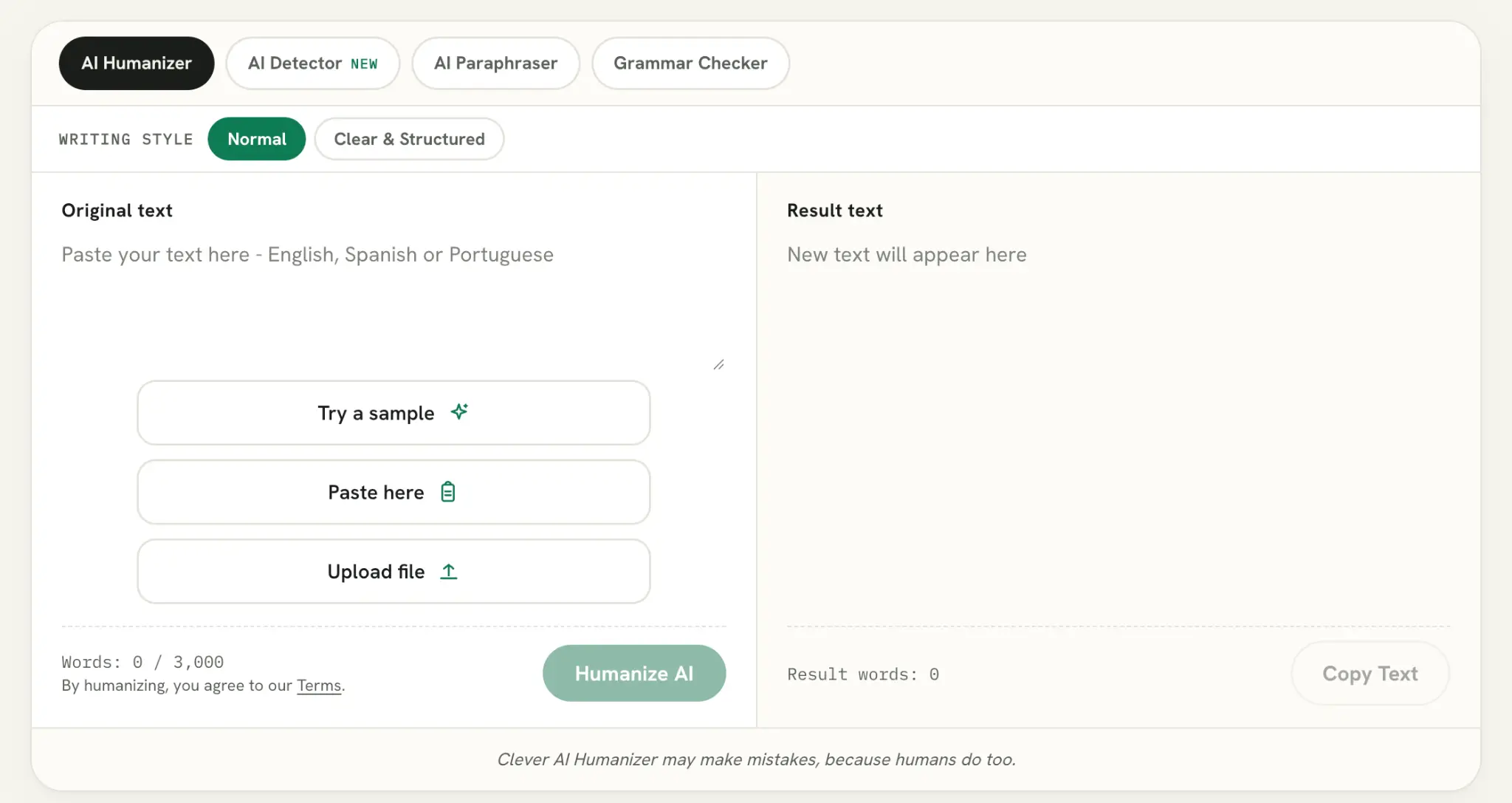
The tool accepts up to 3,000 words per request. There’s no fixed monthly word allowance, and you can use it without creating an account.
One useful detail is the option to view changes in the result rather than simply receiving a completely rewritten block of text. This makes it easier to review the wording and decide whether the new version still reflects your original message.
It’s worth remembering that humanization is not the same as fact-checking. The tool can improve how something reads, but it cannot guarantee that the original information is accurate.
2. Clever AI Detector
Clever AI Detector is another useful addition. It checks whether a piece of writing contains patterns commonly associated with AI-generated text.
Instead of returning only a simple AI or human verdict, it provides:
- An overall AI probability score.
- Sentence-level signals highlighting potentially AI-like passages.
- A report that can be copied and reviewed.
- Check history for registered users.
The detector accepts up to 10,000 words per check, and checks are unlimited. It supports English, Spanish, and Portuguese.
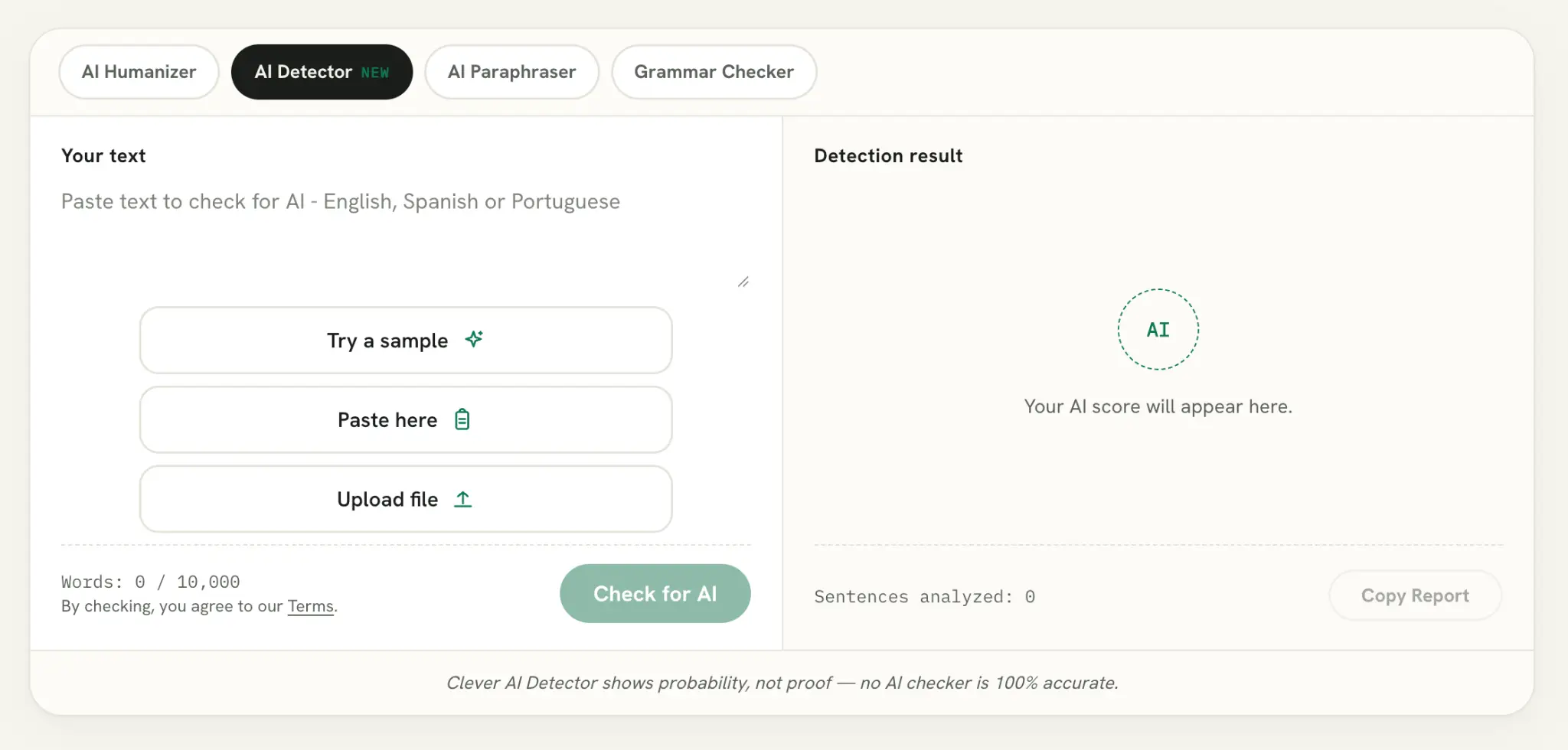
I particularly like sentence-level analysis. A single percentage doesn’t tell you much about which parts of a document may be affecting the result. Highlighted sentences give you something more specific to review.
However, the website is clear about one important limitation: the result is a probability estimate, not proof of authorship. Formal writing, heavily edited passages, and non-native English writing can sometimes trigger false positives. No AI detector should be treated as a definitive test.
3. AI Paraphraser
The Clever AI Paraphraser is more flexible than a basic sentence rewriter. It lets you decide how much of the original wording should change and gives you several ways to control the result.
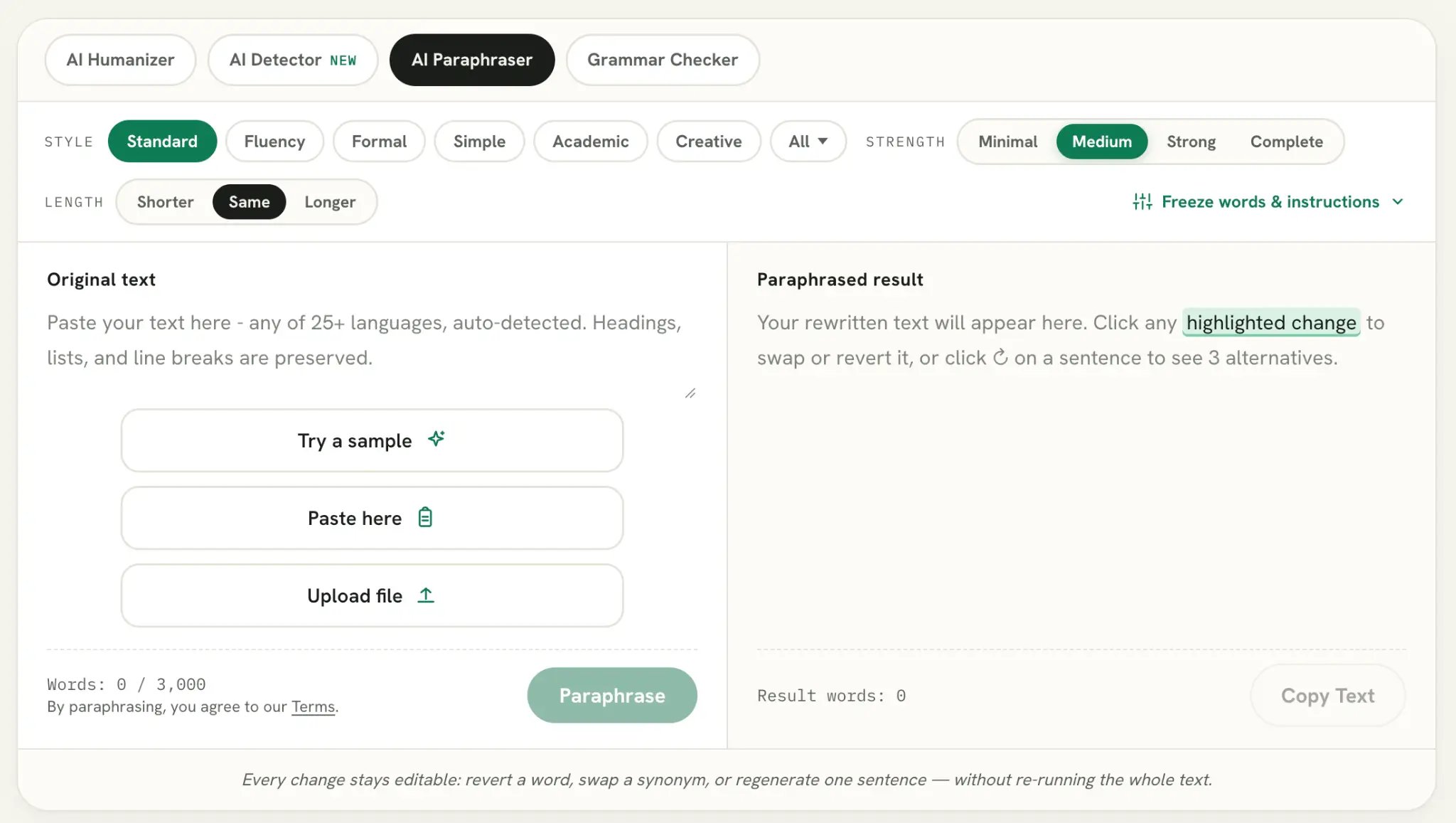
You can adjust:
- Writing style: Choose from 22 styles, including Standard, Fluency, Formal, Simple, Academic, and Creative.
- Rewrite strength: Select Minimal, Medium, Strong, or Complete.
- Text length: Make the result shorter, longer, or keep it around the same length.
- Protected words: Add names, brand names, SEO keywords, and technical terms that should remain unchanged.
- Custom instructions: Tell the tool how you want the text rewritten.
There’s also an option to edit individual changes after the rewrite. You can restore the original wording, select alternative phrases, or generate three alternative versions of a sentence without processing the entire document again.
The Paraphraser supports more than 25 languages and accepts up to 3,000 words per request. DOCX and PDF uploads are also supported.
For content marketers and SEO writers, the ability to protect keywords and brand names is particularly practical. You can improve the surrounding wording without losing the terms that need to remain in the text.
4. Grammar Checker
The Grammar Checker goes beyond highlighting spelling mistakes. It reviews grammar, punctuation, capitalization, clarity, style, word choice, and consistency.
What makes it more useful than a basic correction tool is the way it handles suggestions. Each issue comes with an explanation, and you can accept or dismiss changes individually. There’s also an option to accept all corrections at once.
Other features include:
- Seven categories of writing issues.
- Three levels of severity: errors, improvements, and optional suggestions.
- Writing goals such as Academic, Business, Casual, Professional, and Creative.
- A writing score with Grammar, Clarity, Style, and Readability feedback.
- Sentence-level rewriting options, including Simplify, Shorten, Formal, and Natural.
The checker supports more than 25 languages and accepts up to 3,000 words per check.
I like the distinction between actual mistakes and optional style improvements. Not every long sentence or passive construction is necessarily wrong, and writers should be able to decide which suggestions make sense for their text.
How to Use Clever AI Humanizer
Getting started is straightforward. You can use the tools directly in your browser without installing anything.
Here’s how the main workflow looks:
- Visit cleverhumanizer.ai.
- Choose the tool you need from the navigation menu.
- Paste your text into the editor or upload a supported file where available.
- Select the relevant writing style or editing preferences.
- Click the action button to process your text.
- Review the suggested changes and make any adjustments before copying the result.
For an existing draft, the Humanizer is a good starting point if the writing feels repetitive or unnatural. If you need more control over individual phrases, the Paraphraser is a better choice. The Grammar Checker can then help with proofreading.
The AI Detector is useful when you want an additional perspective on how a text may be classified by an automated checker.
Is Clever AI Humanizer Really Free?
Yes. According to the current website and Terms of Service, the four main tools are currently free to use. There are no advertised subscriptions, credit requirements, or paywalls for their core functionality.
Here’s a quick overview of the published limits:
|
Feature |
Free Access |
|
AI Humanizer |
Up to 3,000 words per request |
|
Humanizer monthly allowance |
No fixed word cap |
|
AI Detector |
Up to 10,000 words per check |
|
AI Detector checks |
Unlimited |
|
AI Paraphraser |
Up to 3,000 words per request |
|
Grammar Checker |
Up to 3,000 words per check |
|
Account required |
No for core tool access |
|
Saved history |
Available with a free account |
|
Ads and paywalls |
None advertised |
Creating an account is optional. Its main benefit is access to saved content and check history, so you can return to previous results instead of starting from scratch.
One qualification: the Terms of Service say the tools are currently free and explain that paid plans may be introduced in the future. So it’s more accurate to describe the current offering as free rather than promise that it will always remain that way.
Privacy: What Happens to Your Text?
Before pasting work documents into any online writing tool, it’s worth checking how the service handles submitted content.
Clever AI Humanizer’s Privacy Policy states that submitted text is processed by external AI and large language model providers to generate results. The company also says it does not use submitted text or generated output to train or fine-tune AI models.
There are a few other details worth knowing:
- Submitted text and generated output are generally retained for 30 days.
- Guest users’ first 100 characters of submitted text are retained for two days for support and troubleshooting.
- Staff may review samples of submitted text for quality checks and debugging.
- The company says it does not sell user data.
This is a reasonably transparent explanation of the service’s data handling, but it doesn’t mean that every submission is confidential. Avoid uploading sensitive business information, private personal details, or documents you are not authorized to share.
Pros and Cons
No writing tool is perfect, and Clever AI Humanizer has a few limitations worth considering.
What we like:
- Four useful writing tools in one place.
- Currently free access without ads or paywalls.
- No registration required for core tool access.
- Up to 3,000 words per Humanizer request.
- AI Detector supports up to 10,000 words per check.
- Sentence-level AI detection signals.
- Paraphrasing controls for style, length, and rewrite strength.
- Protected keywords and custom instructions.
- Grammar suggestions include explanations and accept/reject controls.
- More than 25 languages supported by the Paraphraser and Grammar Checker.
What could be better:
- The Humanizer supports only English, Spanish, and Portuguese.
- The platform is browser-based, so users looking for a dedicated desktop application may need another solution.
- AI detection results are estimates and can produce false positives.
- Humanized text still needs manual review for accuracy, context, and tone.
- Submitted content may be reviewed by staff for quality assurance, so the service should not be treated as a confidential document editor.
Final Verdict: Is Clever AI Humanizer Worth Trying?
Clever AI Humanizer has grown beyond a simple AI rewriting tool. Its four main features cover several everyday writing tasks: improving tone, checking AI-like patterns, paraphrasing passages, and correcting grammar.
The biggest advantage is the combination of these tools without a subscription or a complicated setup. The Paraphraser is especially useful for writers who want more control over the rewrite, while the Grammar Checker provides explanations instead of silently changing every sentence.
There are limitations. The Humanizer supports fewer languages than the Paraphraser and Grammar Checker, there is no dedicated plagiarism checker, and AI detection results should never be treated as definitive evidence.
Still, if you’re looking for a free browser-based toolkit to polish drafts and make writing clearer, Clever AI Humanizer is worth a try. Just remember to review the final text yourself and follow any disclosure or academic rules that apply to your work.
Frequently Asked Questions
Is Clever AI Humanizer Free?
Yes. The four main tools are currently free to use, with no advertised ads, paywalls, or subscription requirements.
How Many Words Can I Humanize at Once?
The current Humanizer supports up to 3,000 words per request. There is no fixed monthly word allowance.
Does Clever AI Humanizer Have an AI Detector?
Yes. Clever AI Detector checks up to 10,000 words per request and provides an overall probability score with sentence-level signals. Checks are unlimited.
Do I Need to Create an Account?
No. You can use the main tools without registering. A free account adds access to saved content and check history.
Does Clever AI Humanizer Have a Plagiarism Checker?
No dedicated plagiarism checker is listed among its four main tools. The AI Detector estimates whether text resembles AI-generated writing; it does not check whether passages have been copied from other sources.
Is Clever AI Humanizer Suitable for SEO Content?
It can be useful for polishing SEO drafts, improving readability, and paraphrasing text while protecting keywords and technical terms. However, it does not replace original research, fact-checking, or editorial review.
Can AI Detectors Always Identify AI-Generated Content?
No. AI detectors work with statistical estimates and can produce false positives or miss AI-generated writing. Clever AI Detector also states that its results are probability estimates, not proof of authorship.