

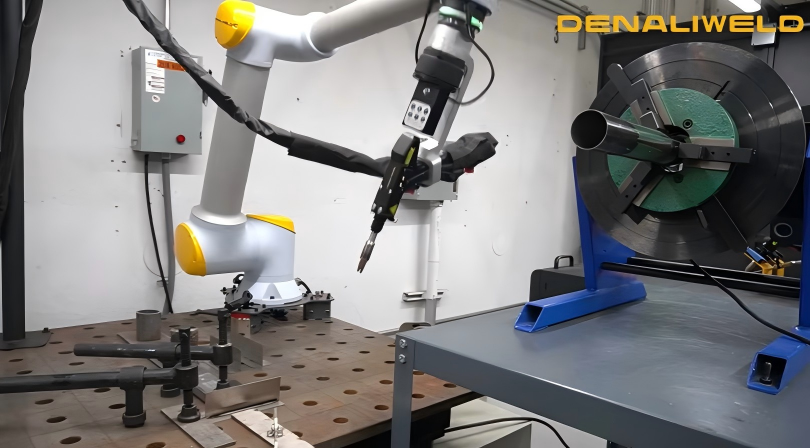
Manufacturing pressure shows up in familiar ways: weld quality can drift from one operator or shift to the next, you still have to protect people when automation runs nearby, and it is not always clear which hardware, software, and integration pieces you need to make a system dependable. If you want consistent welds without building a fenced cell, a cobot welding robot can be a practical option when you understand how the system is constructed and controlled.
A Timely System Example
You will see more “hybrid” setups that let you start hands-on and transition to repeatable automated passes as the job stabilizes. Denaliweld presents its Cobot Series as a laser welding configuration that pairs a handheld torch concept with manual/automatic mode switching, so you can change modes without rebuilding your workflow. If you want to review that category of system, you can start here: cobot welding robot.
What a System Is
A collaborative welding setup is not only an arm with a tool attached. It is a coordinated system that positions the tool, controls the welding process, manages safety, and stores settings so you can repeat a weld on demand. When you evaluate a cobot welding robot system, think in outcomes: stable bead shape, predictable cycle time, and fewer surprises during changeovers.
Definition and Role in Production
In production, the robot handles repeatable motion while you control the process window through parameters and fixturing. That repeatability reduces rework for joints sensitive to travel speed, angle, and heat input. It also supports training because your team follows a defined routine.
Typical System Building Blocks
Most systems share the same building blocks.
|
Building Block |
What It Does |
Why It Matters |
|---|---|---|
|
Collaborative arm |
Moves the weld path |
Reach, access, smooth motion |
|
End-of-arm tool |
Applies energy and filler (if used) |
Bead consistency, serviceability |
|
Power source or laser unit |
Generates welding energy |
Output stability, monitoring |
|
Controls and I/O |
Manages signals and interlocks |
Safe starts, clear faults |
|
Operator interface |
Stores jobs and parameters |
Fast changeover, fewer errors |
|
Data logging |
Records settings and events |
Traceability, quality review |
Core Hardware Components
Robot Arm and Motion
The arm is your positioning engine. Reach determines whether you can approach the joint with a clean angle and consistent standoff. Motion quality matters because path jitter can manifest as uneven bead shape, especially on thin materials. You want smooth travel and enough wrist freedom to hold a steady tool angle.
Toolhead and Process Gear
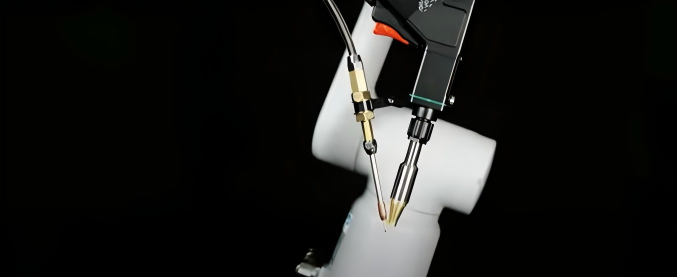
Your toolhead could be an arc torch or a laser head, depending on the process. Either way, the goal is stable energy delivery at the joint. Pay attention to cooling, consumable access, and how the system maintains a consistent working distance, as these factors affect uptime.
Controls, I/O, and Comms
Controls connect motion to welding. A typical setup uses inputs and outputs for cycle start, part-present checks, clamp confirmation, fault states, and emergency stops. Reliable communication helps you diagnose stops quickly and makes future integration easier.
Control Software and Programming
Operator Interface Setup
Job recipes make collaborative welding scalable. When travel speed, power level, timing, and approach positions are stored as a named job, you reduce setup errors and speed changeovers. This matters most in high-mix work, where you often return to the same tasks.
Programming for Repeatability
Repeatable welds come from repeatable conditions. A dependable workflow usually looks like this:
- You define a stable part reference using fixtures or locating points.
- You teach approach and departure maneuvers that avoid collisions and maintain stable angles.
- You lock process parameters into the job so settings do not drift across shifts.
- You verify on a short sample run before committing to a full batch.
Data Capture and Traceability
At a minimum, logging job name, operator, parameter set, and alarms helps you connect quality outcomes to a specific configuration. If you work in regulated or high-liability fabrication, deeper traceability may be required, but it only helps if your team uses the records consistently.
Operating Modes, Safety, and Integration
Manual-to-Auto Switching
Mixed production is common. You might manually tack or touch up, then run automated passes to repeat. A system that supports quick switching reduces wasted time and reduces the temptation to skip programming when schedules get tight. Denaliweld highlights a manual/automatic switching button approach intended to make that changeover straightforward.
Collaborative Safety Features
Collaborative does not mean risk-free. You still need a documented risk assessment, a clear emergency stop strategy, and safety functions that match the task. Many teams reference ISO/TS 15066 when planning collaborative operations where people and robot systems share a workspace. In practice, you control speed, force, and access, and you train operators on what the system will do in each mode.
Integration and Compatibility
Before you commit, confirm space, part flow, fixtures, fume control, and how the cell exchanges signals with upstream and downstream steps. Also, plan where teaching will occur and how parts will enter and exit the work area. When these details are solved early, daily production feels natural.
Performance Drivers and Selection
Precision, Speed, and Reach
Precision is not only a robot spec. Your real precision includes fixturing, part variation, and process stability at the joint. Speed helps only within a stable process window; pushing travel too fast can cause defects. Reach matters because awkward access forces slower paths and inconsistent angles. If you want the most value from a cobot welding robot, test reach and joint access with your parts, not only a spec sheet.
Flexible Application Fit
Collaborative welding is often most effective when there is repetition without full standardization. High-mix work can still benefit from reusing programs, fixtures, or parameter sets across part families. Look for applications where improved consistency saves rework time.
Sensing for Consistent Quality
If your joints are not perfectly consistent, sensing can help. Seam tracking and basic feedback can reduce misalignment when parts have a tolerance stack-up. You should also plan checks for missing parts, open clamps, and out-of-range conditions, because interlocks prevent scrap better than rework.
Conclusion
Collaborative welding works best when you treat the system as a whole: motion, process control, safety, and repeatable programming all support the quality you want. Focus on reach, integration, and recipe discipline, because those factors control your day-to-day results. If you want a real-world example of mode switching and operator-friendly setup, Denaliweld is a reference point, and a cobot welding robot approach can help you maintain quality while maintaining flexibility.